


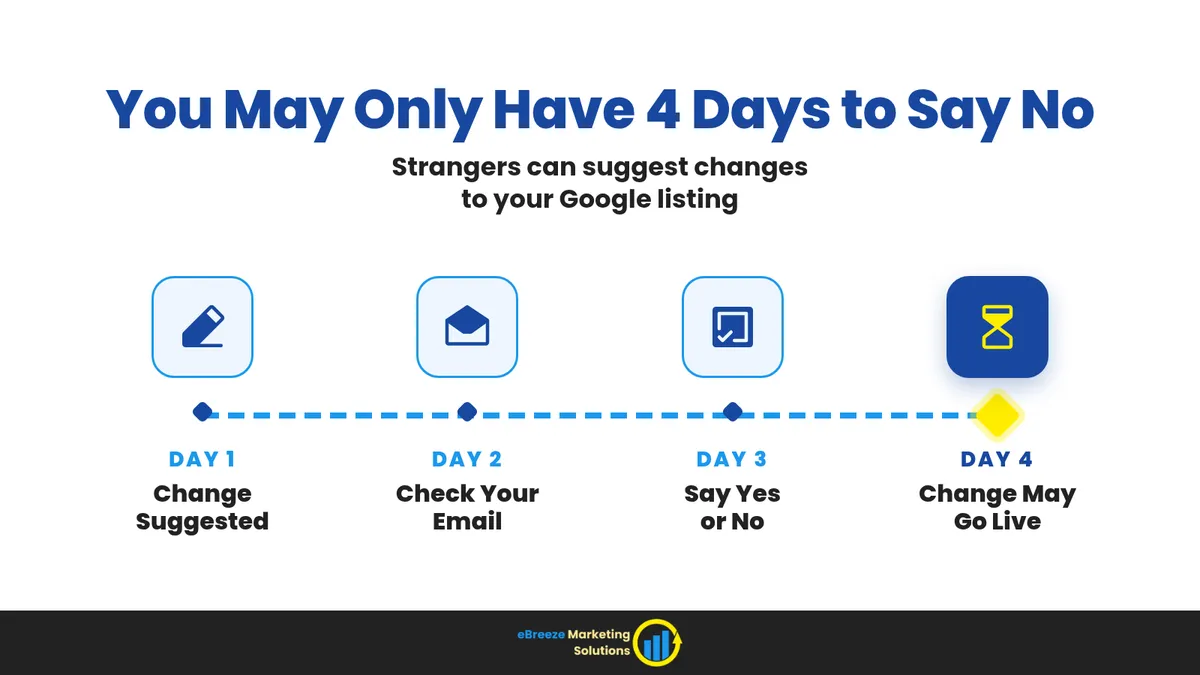
Strangers Can Change Your Google Listing. You May Have Just 4 Days to Say No.
Anyone can suggest a change to your Google listing, like new hours or a new phone number. If you don't say no in time, Google may make the change.
It's 6 a.m. The house is 58 degrees. A homeowner in a bathrobe grabs a phone and searches for furnace repair. They don't look at five websites. They don't read your About page. They tap the first business on the map that looks open, and they call.
That map result is your Google listing. Google calls it a Google Business Profile. For HVAC contractors, it's often the first place people go when the heat goes out. If it shows old hours or an old phone number, that call goes to another shop. You never hear about it. The homeowner isn't going to send you a nice note saying, "Hey, I tried."
When the Heat Goes Out, People Call the Business Google Shows Them

When the heat is out, people don't take their time. They're cold and a little panicked. They want to talk to a real person right now. So they pick fast, and they pick from what Google shows them.
ACHR News talked to HVAC contractors about this in an October 6 article. These shops have moved away from building new homes and toward fixing and replacing equipment. Ryan St. Michel, CEO of Grove Mechanical in Minnesota, said, "Speed to lead is something that really changed for us." In plain words, that means getting back to a new customer fast. He also said, "We didn't understand lead generation before." Lead generation just means finding new customers.
Craig Ouimette, president of Cardinal Heating, Cooling, Plumbing & Electric in Wisconsin, put it simply: "Unlike construction, the phone doesn't automatically ring."
Here's the thing. Answering fast only helps if the call reaches your phone. Even the best person at your front desk can't answer a call that Google sends to the wrong number. So first, make sure your listing has the right information.
Google Gives You 4 Days to Say No

Many owners don't know this. Anyone can suggest a change to your Google listing. A customer, a neighbor, or a stranger who thinks your hours look wrong can click "suggest an edit." They can suggest changes to things like your hours or your phone number.
Google's help page explains what happens next. For some of these changes, Google lets you know first. In Google's words, "If a suggested edit requires your review, you may receive an email or an in-product notification. Once notified, you have 4 days to accept or reject the suggestion." (That second part just means a message inside your Google account.)
What if you don't answer? Google says, "If you don't respond within 4 days, Google may automatically publish the update if it is supported by other publicly available information, such as your business website."
Look closely at two words there: "may" and "if." Not every change goes live after 4 days. But some can. Google also says it "may apply suggested user edits to your business information without prior review" when it needs to follow its rules. So you won't always get a warning.
Four days isn't much time, especially in a busy, cold week. If Google's email goes to an inbox nobody reads, the 4 days can pass without anyone noticing.
What to Check on Your Google Listing Before It Gets Cold

The good news is that this isn't hard. You just need someone who looks at your listing often. Here's what to check:
- Hours that are true. If you offer late-night or emergency service, say so. If you don't, don't say you do. A homeowner who calls at 2 a.m. and gets voicemail will remember that.
- A phone number someone answers. Make sure it's your main line. It shouldn't be an old cell phone or the number of a tech who left two years ago.
- The towns you really serve. If your trucks don't go 40 miles out, don't list towns 40 miles away.
- A website that says the same thing. Google says it looks at "other publicly available information, such as your business website." If your website shows old hours, Google may think a wrong change is right. Keep your website and listing the same.
- New photos of your real team and trucks. Stock photos of a smiling model holding a wrench don't build trust. Photos of your own van in your own town do.
- A short post for the season. Something like "Booking furnace tune-ups now" shows people you're open and busy.
- One person in charge of the email. Pick one person to watch the email account where Google sends its notices. Have them check the spam folder too. An email that sits there for 4 days doesn't help anyone.
None of this costs much. It just takes a habit.
Make Sure Your Listing Gets You the Call

Your listing has one job. It should get the homeowner talking to your team fast, so the call turns into a booked service call.
Start with the buttons. Open your listing on your own phone and tap "Call." Does it ring your shop? If you offer online booking, tap that too. If it goes to a broken page, fix it.
Next, look at your reviews and questions. People read them before they call. Ouimette told ACHR News that contractors need "strong reviews" along with steady marketing. A quick, polite reply to each review shows that a real person runs the business.
Then check your listing every week. Look at it the way a cold homeowner would. Are the hours right? Does the phone number work? Do you see any blue text? Google's help page says that when you open your listing to edit it, blue text shows information Google changed. Catch it now, before a slow week makes you wonder where the calls went.
Quick Answers About Google Listing Edits
What is a "suggested edit" on Google, and who can make one?
It's a change someone asks Google to make to your listing, like new hours or a different phone number. Almost anyone with a Google account can suggest one. That includes customers, people who drove past your shop, and folks who are just wrong.
What happens if I don't answer Google within 4 days?
For changes that need your review, Google says it "may automatically publish the update if it is supported by other publicly available information, such as your business website." So the change might go live, or it might not. It's better to answer fast and keep your listing right.
Can Google change my listing without asking me at all?
Yes, sometimes. Google says it may make some suggested changes without asking you first when it needs to follow its rules. That's why you should check your listing often, even if you never get an email.
How often should a contractor check their Google Business Profile in winter?
Once a week is a good habit during heating season. It only takes a few minutes. And it costs a lot less than losing a week of calls to a wrong phone number.
Should my listing say "24/7 emergency service" if we don't really answer at 2 a.m.?
No. Only list what you really do. An honest listing builds trust. A listing that promises someone will answer at midnight, and then sends people to voicemail, does the opposite.
Check Your Google Listing This Week
Cold weather will bring calls whether your listing is ready or not. The shops that get those calls aren't always the biggest. They're the ones with the right information when a cold homeowner looks them up. A few minutes a week can keep those calls, and that money, coming to you.
So check your listing this week. Answer Google's emails about changes fast. Make sure your hours, phone number, and website all match. If you'd like help keeping your listing right all season, see how we work with home service contractors.
